Slack Approval Buttons for AI Bots: Nothing Ships Without a Click
The most important component in my bot stack is not the model. It’s a Slack message with two buttons.
Our bots send monthly statements to customers by email, answer “how much did we spend in May?” questions from restaurant owners, and issue referral rewards. Every one of those actions goes through the same gate: the bot prepares the thing, posts a card in Slack, and does nothing until a person clicks Approve.
This post is the structure of that card, why it’s shaped the way it is, and three mistakes it caught in its first months.
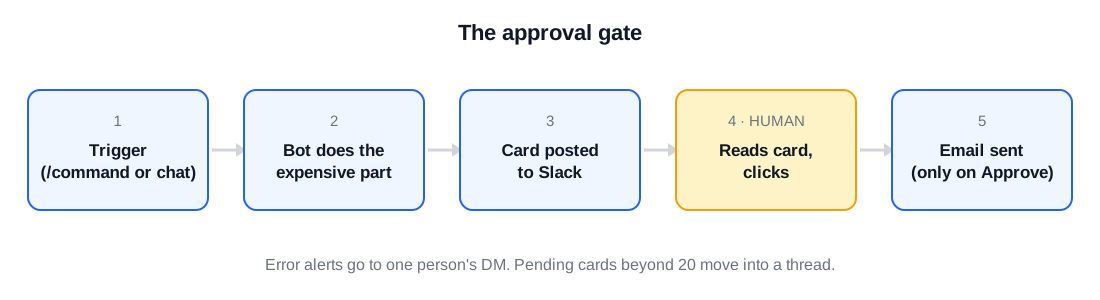
The flow in one picture
- A trigger arrives. Someone types
/statement-bot <company> <month>in Slack, or a customer asks a question in our support chat. - The bot does the expensive part: queries our dashboards, builds the spreadsheet, calculates the number.
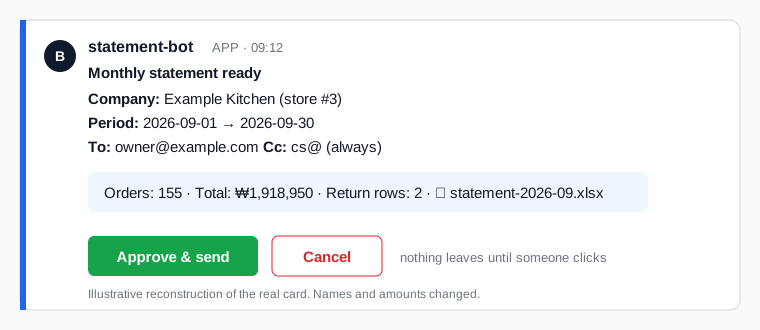
- The bot posts a card: what it’s about to do, to whom, the attachment, and two buttons.
- A human reads it and clicks Approve or Cancel.
- Only on Approve does the email leave, or the reply get sent.
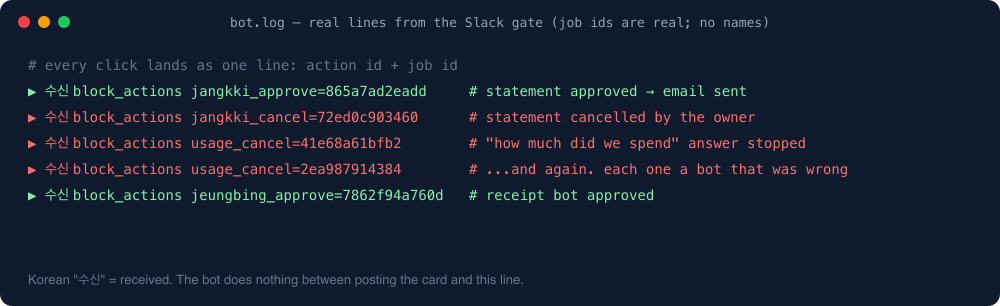
The bot’s log is full of lines like these:
▶ received block_actions usage_approve=2c0f4e0b2692
▶ received block_actions usage_cancel=ad7d871bca78
▶ received block_actions usage_cancel=f46f78461829
Those cancels are the whole point. Each one is a case where the bot was confidently wrong and a human spent two seconds stopping it.
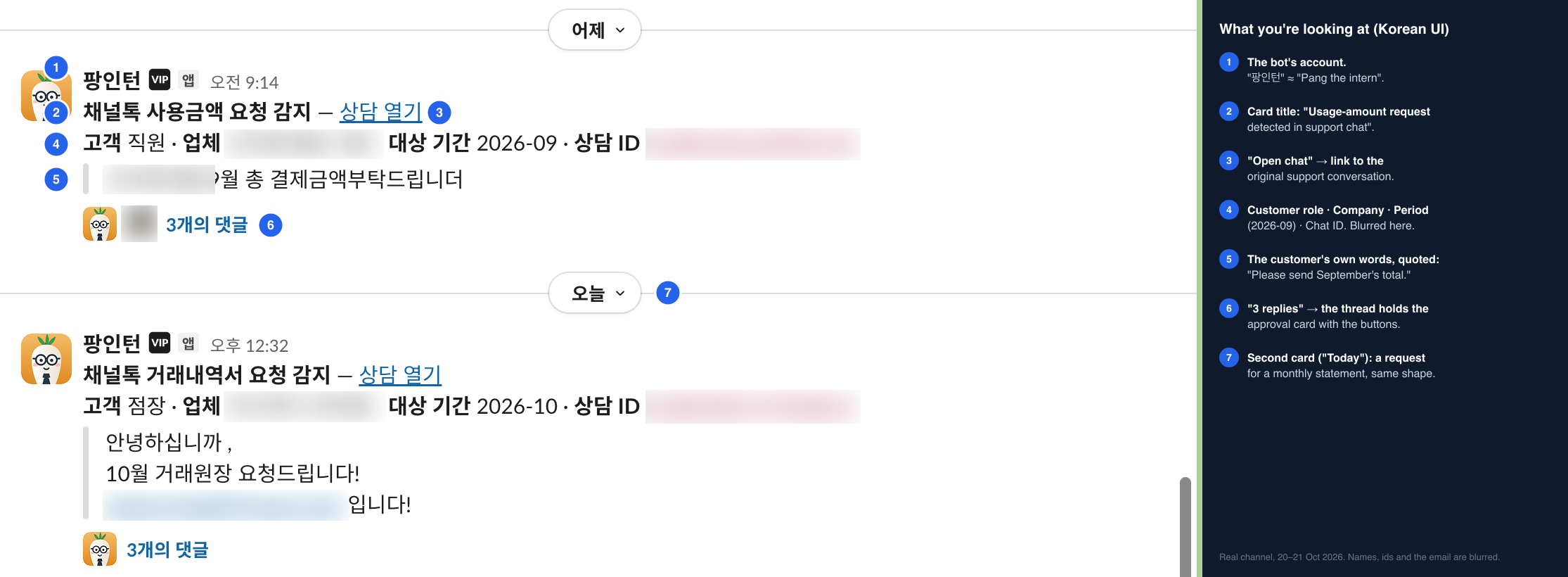
This is what the channel actually looks like. The bot (we named it “팡인턴”, roughly “Pang the intern”) spots a request in our support chat and posts a detection card: customer role, company, period, chat id, and the customer’s own words. The approval card with the buttons lives in the thread under it, which is why each one shows “3 replies”. The UI is in Korean, so the numbered legend on the right explains each part. Company names, chat ids and the email are blurred.
The card, concretely
Block Kit is verbose, so here is the shape rather than the full JSON:
{
  "blocks": [
    {"type": "section", "text": {"type": "mrkdwn",
      "text": "*Monthly statement ready*\n*Company:* <name>\n*Period:* 2026-09\n*To:* <contact email>\n*Cc:* cs@..."}},
    {"type": "section", "text": {"type": "mrkdwn",
      "text": "Orders: 155  ·  Total: ₩1,918,950  ·  Returns: 2 rows"}},
    {"type": "actions", "elements": [
      {"type": "button", "style": "primary", "text": {"type": "plain_text", "text": "Approve & send"},
       "action_id": "jangkki_approve", "value": "<job id>"},
      {"type": "button", "style": "danger", "text": {"type": "plain_text", "text": "Cancel"},
       "action_id": "jangkki_cancel", "value": "<job id>"}
    ]}
  ]
}
Three design rules hide in there:
- The card shows the numbers the human needs to sanity-check, not the data. Order count, total, number of return rows. If the total looks wrong, you cancel. You don’t open the spreadsheet.
- The recipient is on the card. The single most dangerous bot mistake is sending the right document to the wrong company. The address is the first thing you read.
- The job id is in the button value, not in the message text. When the click arrives, the bot looks up the job by id. Nothing is parsed from the human-readable text.
Who clicks, and who gets paged
The approver is whoever owns the customer. The bot cc’s our support mailbox on every send, always. That isn’t configurable from the card, on purpose: a human choosing “no cc” at 6pm on a Friday is how documents disappear.
Error alerts are different. Every bot error goes to one person’s DM: me. Not a channel. I tried a channel first and it became wallpaper within a week. A DM with a red circle in it does not become wallpaper.
Three things the button caught
1. The duplicate shipping fee. The statement bot was adding the delivery fee once per line item instead of once per order. The card showed a total that was visibly too high for a small customer, and the owner cancelled it. The bug had been invisible in the dashboard, which repeats the fee the same way. We fixed the bot. The dashboard still does it.
2. The “N stores” ambiguity. A customer asked for their monthly usage and said the name of their brand. The bot found one store. The human knew the brand had several stores under slightly different names, cancelled, and asked. The rule we added: if the request only names a brand, list every store under it before answering.
3. The wrong month. Someone asked for “last month” on the 1st. The bot picked the month that had just ended. The approver expected the one before. Now the card says the period as explicit dates, never as a relative word.
What happens when cards pile up
The referral-reward bot posts a card per pending reward. In October the queue passed 20 cards and the channel became unreadable. The fix was small: after 20, new cards go into a thread under the first one, and the top-level message shows a count. If your bot can produce more than a screenful of approvals, decide now where the overflow goes.
The part that’s not a button
A gate only works if the thing behind it is boring to approve. Our rule: every card must be checkable in under ten seconds by reading it, not by opening anything. When a card needs the approver to go look at a spreadsheet to decide, the bot isn’t ready, and we go back and put the missing number on the card.
We have never had a bot send a statement to the wrong customer. Not because the model is good, but because a human reads the address every single time.
Next: the Google Sheet that all of these bots write to, and what broke when it reached 85% of its cell limit.