Google Sheets as a Bot Database: What Broke at 85% of the Cell Limit
If you run a small company, your database is a Google Sheet. Mine is called the Claims DB. Every customer complaint we’ve handled lands there as a row: who, what, which product, which supplier, how much it cost us. Humans wrote the rows for years. Since 2026 a bot writes most of them.
This is what a year of bot writes did to that sheet, the audit that found it, and the layout changes that let it keep working.
The symptom
The sheet got slow. Then “slow” became “freezes for 20 seconds when you type”. Then the Apps Script that validates entries started timing out.
The first guess was “too many rows”. That was wrong, and the way it was wrong is the useful part.
The audit
Google Sheets caps a file at 10 million cells, and performance degrades well before that. Our file was at 85.5%. Rows alone didn’t explain it. Three things did:
1. Formula columns had been dragged to the bottom of the sheet. Someone, years ago, filled formulas down to row 50,000 so that “new rows would just work”. Every one of those empty rows counted against the limit and recalculated on every edit.
2. About 20,000 of those formulas were volatile. TODAY(), NOW(), INDIRECT(). Volatile formulas recalculate on every change anywhere in the file. Twenty thousand of them, recalculating on every keystroke, was the freeze.
3. Deleting old data didn’t help. The obvious fix was to archive a closed branch’s rows. We did. It freed 0.7% of the limit. The rows were never the problem.
What we decided to keep
One supplier stopped trading with us in September. Their rows were a candidate for deletion. We kept them, because when we ran the numbers, that supplier accounted for 13% of our total recorded loss cost. Deleting them would have made our loss history wrong for every analysis after. The archive rule became: rows leave the sheet only when they leave the analysis too.
The layout that fixed it
The sheet now has an explicit split that every bot and every human follows.
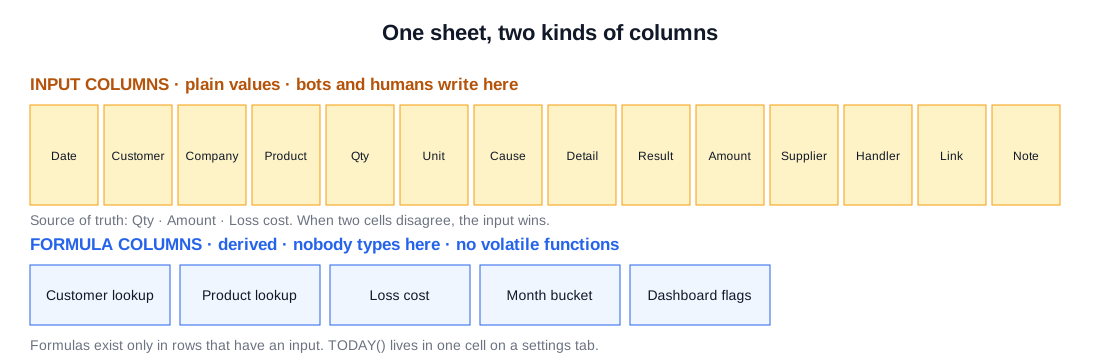
Input columns (15 of them). Date, customer id, company, product id, product name, quantity, unit, cause category, detail, resolution, amount, supplier, handler, chat link, note. These are the only cells a bot or a person is allowed to write. They are plain values. No formulas.
Formula columns. Everything derived: lookups into the customer and product tables, cost calculations, month buckets, dashboards. Formulas exist only in rows that have an input, and they’re ARRAYFORMULA style ranges, not dragged-down copies. No volatile functions in the main sheet at all; TODAY() lives in exactly one cell on a settings tab and everything references that.
Three numbers are the source of truth. For any claim, the three cells that matter are the quantity, the amount, and the loss cost. Every other number is derived from those. When two columns disagree, we know which one wins: the input.
The bot-specific rules
Letting a bot write rows surfaced problems a human writer never caused.
Dropdowns must stay dropdowns. One column has a category dropdown whose allowed values depend on another column. The bot kept writing values that looked right but weren’t in the list, and data validation silently flagged thousands of cells. The fix was on the bot side: it may only write a category it learned from the existing rows, and if it can’t find one, it leaves the cell empty for a human.
Two columns must agree, instantly. Column T (the chosen supplier) and column V (its code) have to match, as do AA and AB for the product. An onEdit trigger now fixes the paired column the moment either one changes. Then someone pressed Undo, which reverted one of the pair and not the other. A one-minute reconciliation job compares the pairs and repairs any mismatch, with AA defined as the master.
The bot waits for context it can’t see. When the bot can’t identify the customer’s company, it doesn’t guess. It writes a pending row and retries every ten minutes until the customer’s profile has a company name. The alternative, guessing, produces a row that looks fine and is wrong.
New rows get five seconds, new companies get five minutes. Auto-fill of the lookup columns runs on a short delay after a bot write, because the bot writes in bursts and the sheet needs a moment. For a company that has never appeared before, a second pass runs five minutes later, after the customer table has had time to pick it up.
The timing that keeps humans and bots apart
The bot’s batch write runs at 03:00. The unshipped-orders bot runs at 05:00. Humans arrive at 09:00. That schedule isn’t about load; it’s so that a human never sees a half-written row, and the bot never fights a human for the same cell.
What I’d do differently
- Put the input/formula split in place on day one. Retrofitting it onto a live sheet took a weekend and a lot of nerve.
- Never drag a formula to the bottom of a sheet. Ever.
- Decide the archive rule before you need it, and decide it based on what the data is for, not how old it is.
Google Sheets is still the right database for us. The team can read it, fix it, and filter it without asking anyone. The limits are real, but every one of them was a layout mistake, not a Sheets mistake.
Next: the bot that writes those rows, built from closed support chats.